The Ultimate Library for All Mii Operations in Any Language
This is continued from my other post on where my Mii projects stand. That’s when I first introduced Fusion, and this post goes into more depth on my plans.
- MERGE BEST OF OTHER POST and REMOVE 2 FROM THIS ONE
- REVISE with IMAGES, LINKS
- HOW IS THIS DIFFERENT than the BRIEF EXPLANATION for my FRONTEND
- what does this bring to the table…?
- BEFORE PUBLISHING BOTH POSTS: consider OPTIMIZING IMAGES and FILENAMES?????
Miis are deceptively complicated
On the surface? A cute Nintendo character creator. Choose a face shape, eye type, some sliders, done. Behind that, there’s an entire hidden world that nobody fully appreciates until they sit down and try to read the raw data.
Mii character data is stored in a fully custom binary format, where values are tightly packed into bitfields.
A single 32-bit integer can hold several different values: eye type, eyebrow rotation, nose scale, mole X/Y position - all packed into specific bits.
Here’s what that looks like when you’ve deciphered it. One byte stores three values.
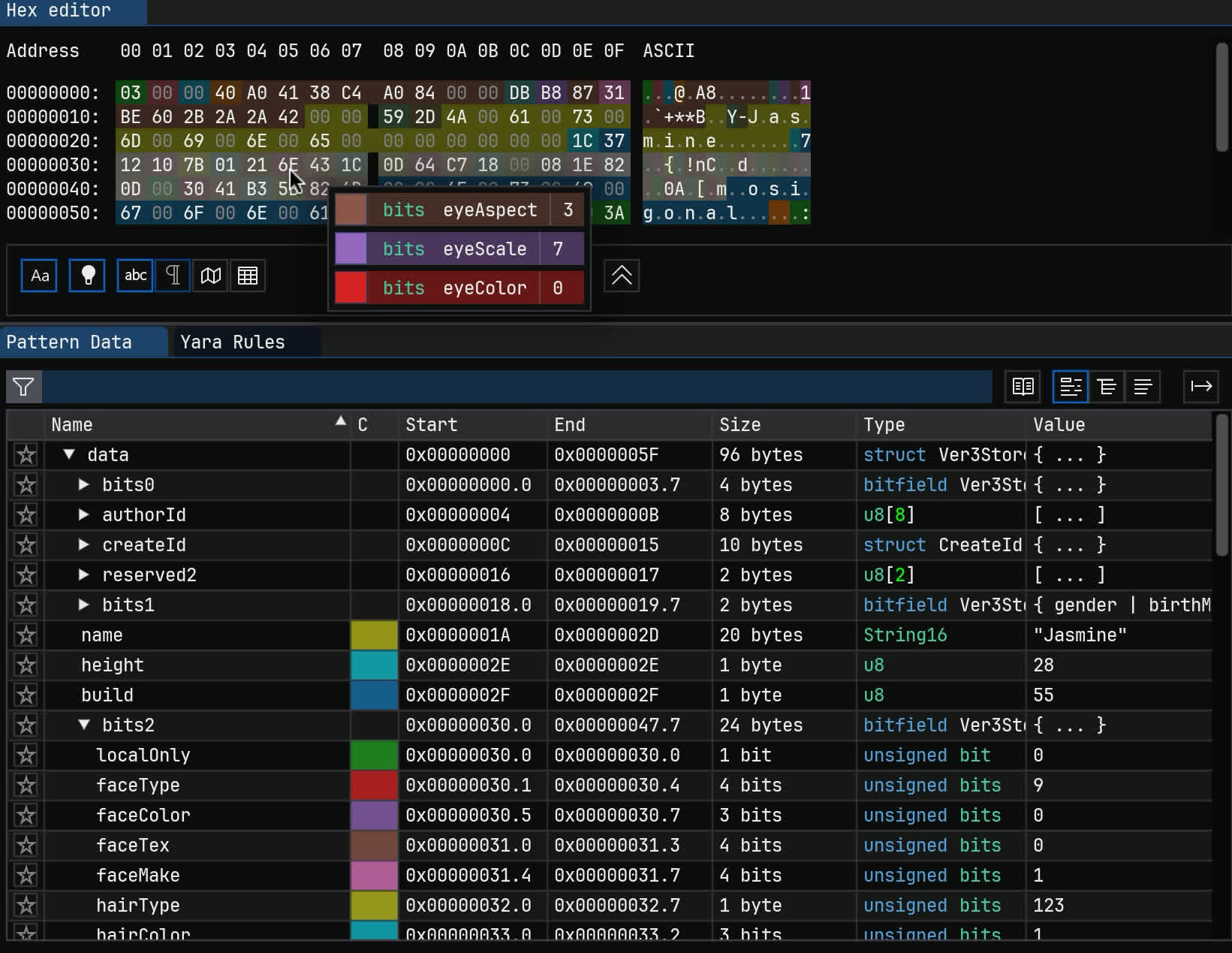
There are dozens of fields, spread out across a 96-byte structure that’s been more or less the same since Miis debuted in 2006.
On top of that, this layout changed across platforms. Wii data (RFL), 3DS/Wii U data (CFL/FFL/“Ver3”), and Switch (CharInfo/CoreData) are all incompatible and store things slightly differently. As a testament to efficiency, Switch CoreData is smallest at 28 bytes.
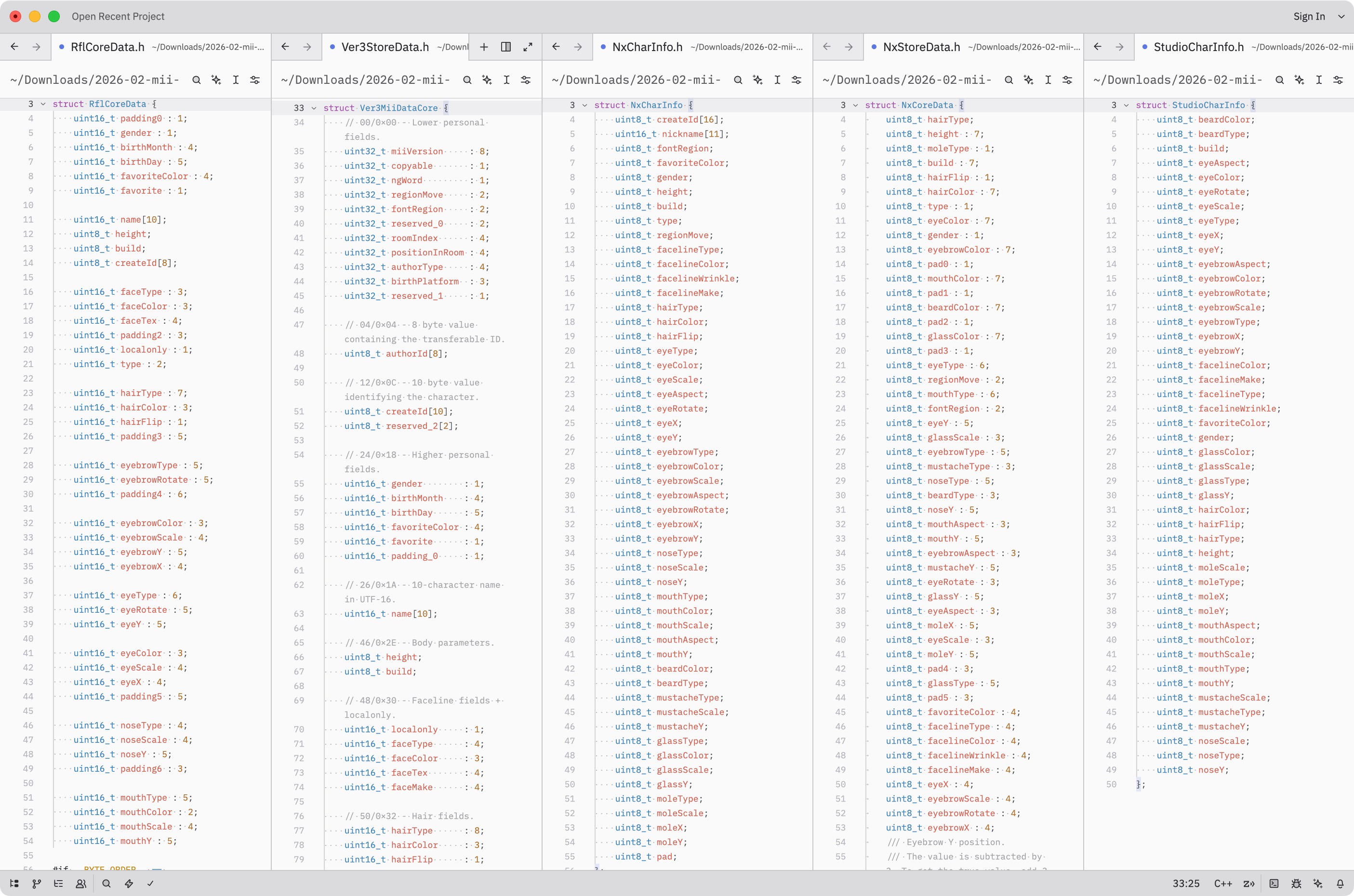
All formats overlap, but have unique fields:
- Switch has more colors that have to be changed to/from old formats
- Fields for creator name and sharing were removed on Switch
- The “Mii ID” further packs creation time and console in some formats.
Then there’s the format for the Nintendo Account web editor (obfuscated), QR codes (AES-CCM encrypted), and the local databases that differ per console.
And we haven’t even touched on the resource files — the shape and texture data that’s actually used to render faces and features, which are in completely different format families.
So, there’s a lot here. Which brings us to the obvious question: what does the existing ecosystem look like?
The “Mii data” ecosystem as of 2026
It’s not great!
I spent some time cataloging every Mii implementation I could find on the internet. There are implementations in most major languages: JavaScript, Python, C#, Rust, Go… and they all have their own problems. Some are incomplete. Some have fields guessed at (or just wrong).
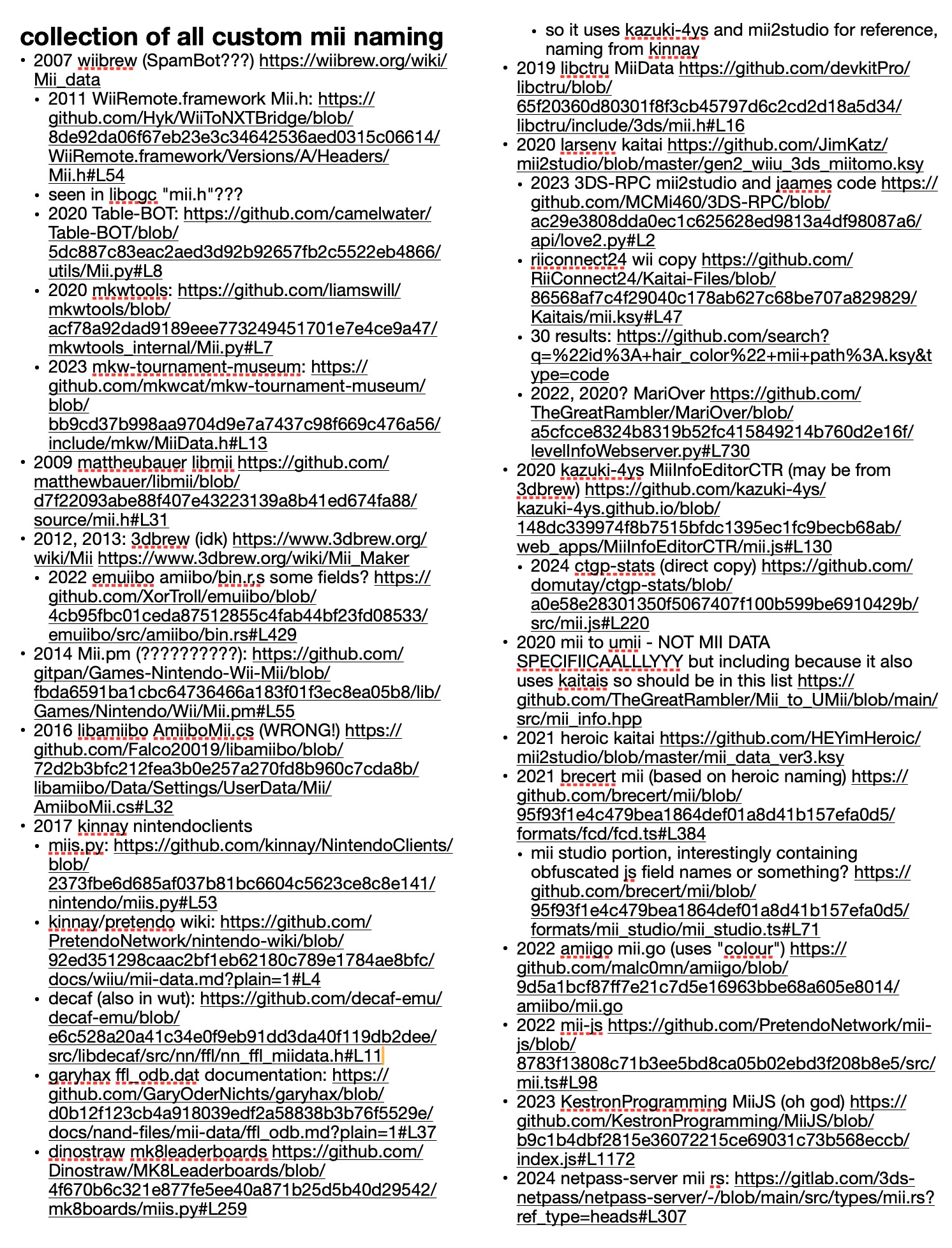
A huge page I made full of as many Mii implementations I could find. There are AT LEAST 29 unique ones.
The naming is absolutely everywhere:
- “fatness” vs “weight” vs “build”
- “sex” vs “gender” vs “isGirl” vs “female”
- “eyeSquash” vs “eyeScaleY” vs “eyeAspect” vs “eyeVerticalStretch”
… You get the point. I’m not suggesting the original names are great either, though I’d at least want everything to be consistent. We can always use comments to convey what they really do.
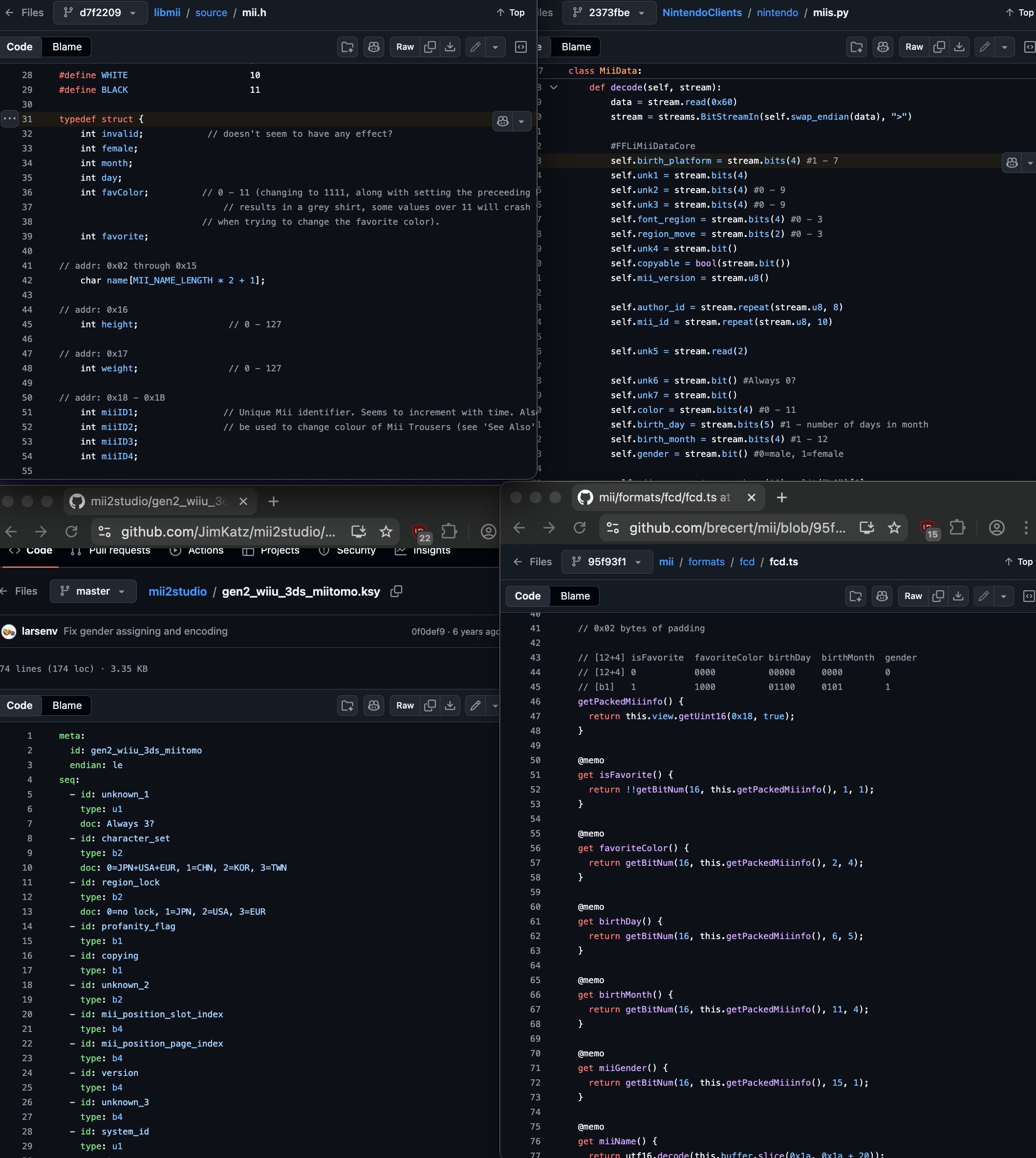
Four Mii implementations. Barely anything in common.
But one of the worst parts is that they end up copying from each other, including the bugs.
There’s a widely-used script called mii2studio.py that has an error in how it maps mouth colors. That same bug has since spread to who knows how many downstream implementations that used it as a reference. Same story with Mii structs on 3DBrew/WiiBrew wikis that got copy-pasted with wrong field names into new projects.
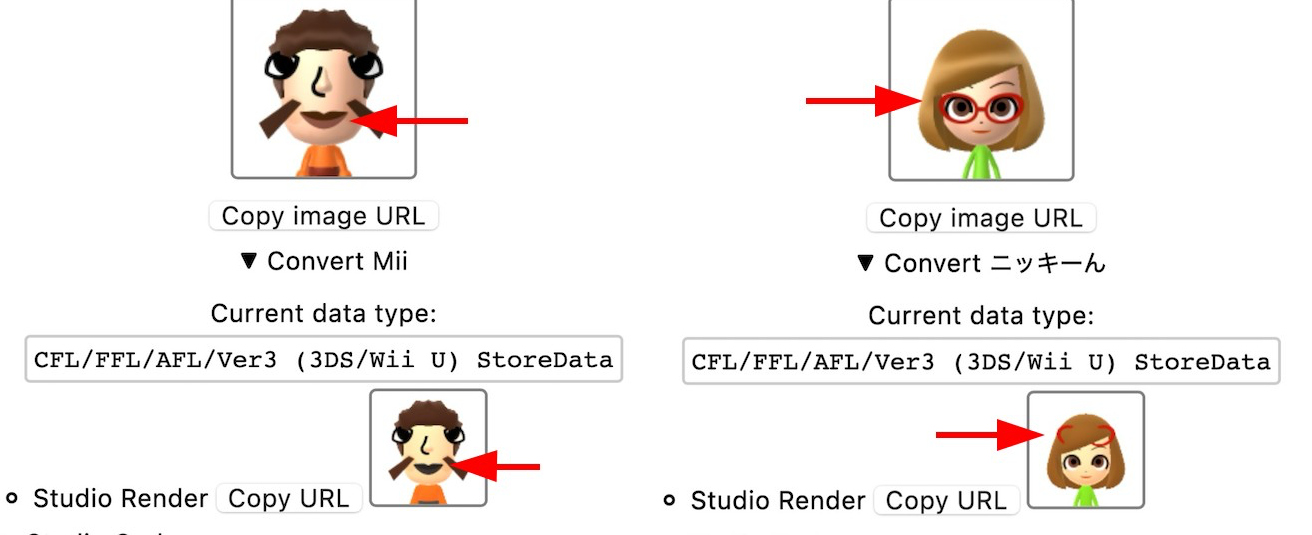
Bugs copied from mii2studio.py.
What I wanted was a library grounded in decompiled Nintendo code. That includes real field names from debug info we previously didn’t have, accurate structures and layouts, provable behavior matching the real binaries. That doesn’t exist yet, and I plan to make it.
Which language do we use?
If I’m going to write a definitive Mii library, what language do I write it in? This seems like the obvious first question but it took me embarrassingly long to think through properly.
My first instinct was JavaScript, because it works for convenient web tools and desktop/server uses. But I’ve already written Mii data code in C++ for the renderer server, JS for the website, Go for an earlier web server… and others have Python versions, C# versions, Rust versions. Would I really have to write and maintain this thing six times?
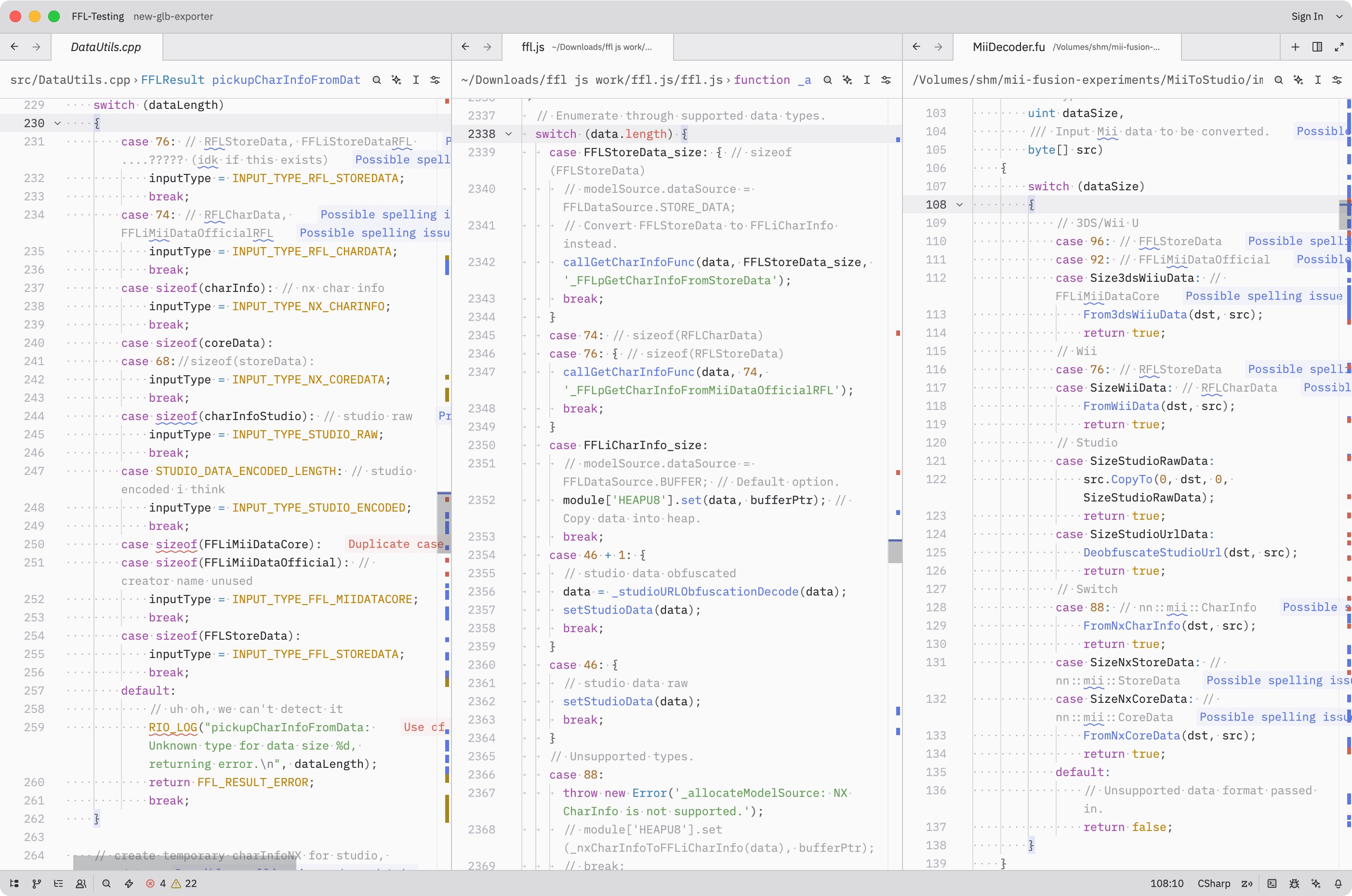
Example of a similar-looking snippet I’ve had to copy over and over again.
I talked about this in my previous post, but: in March 2025 I found the Fusion Programming Language. The concept is that you write code once, and it transpiles cleanly to C, C++, Java, JavaScript, TypeScript, Python, C#, and Swift.
With Fusion, you write “library code” (not applications, not I/O, not UI) and it works wherever you need it. For my goal of one accurate and well-tested Mii library that “just works”, I thought this was perfect.
It could also end the cycle of people needing Mii code in their own language and always having to invent it themselves. It’s already in their language!
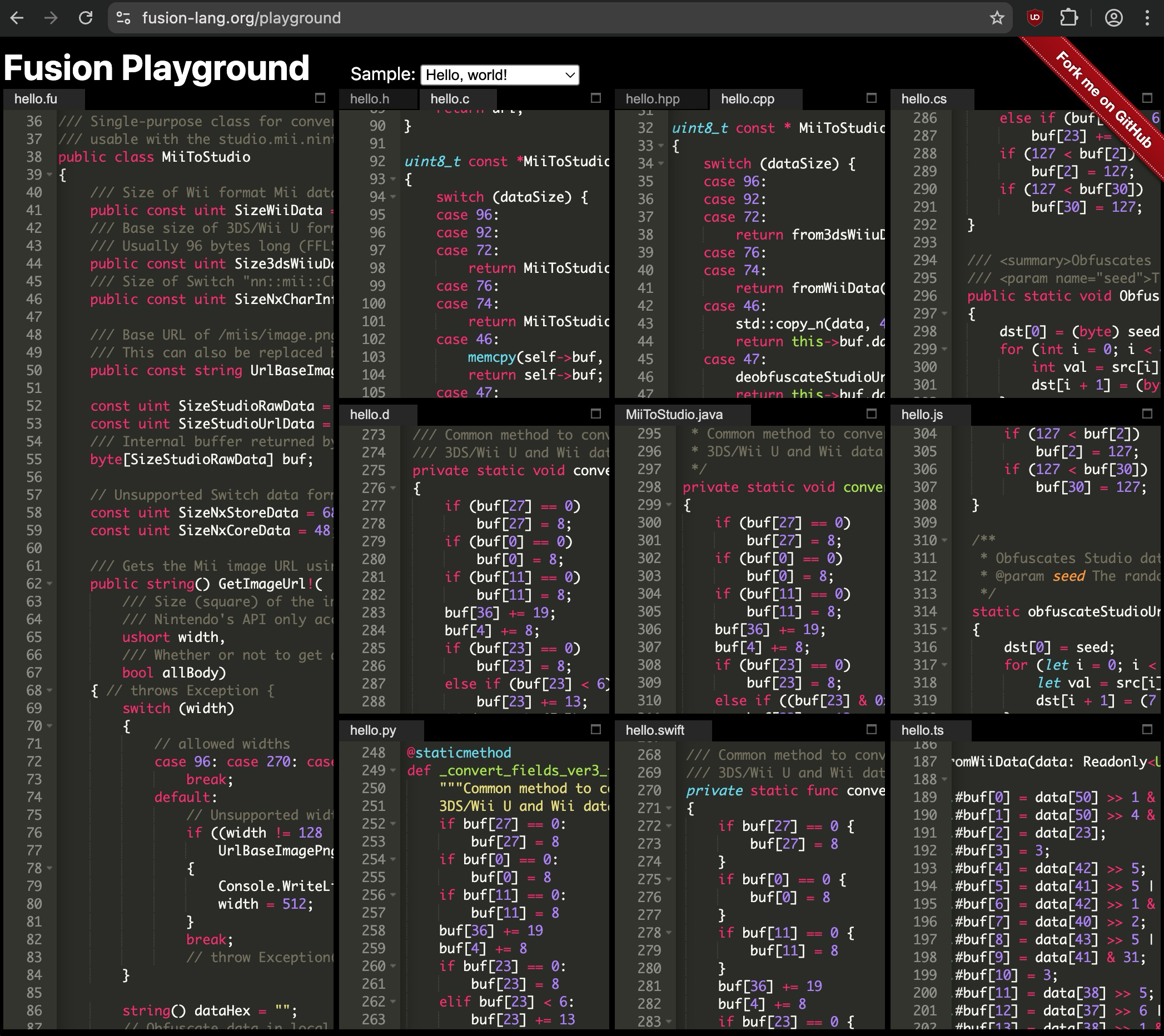
MiiToStudio.fu transpiled using the Fusion Playground.
If it sounds too good to be true… it kind of is. But not in the ways you’d expect.
Challenges with using Fusion
Binary structures
These days, when you want to exchange “data” between computers, it’s usually in text form. Something in-between human and machine readable, like JSON:
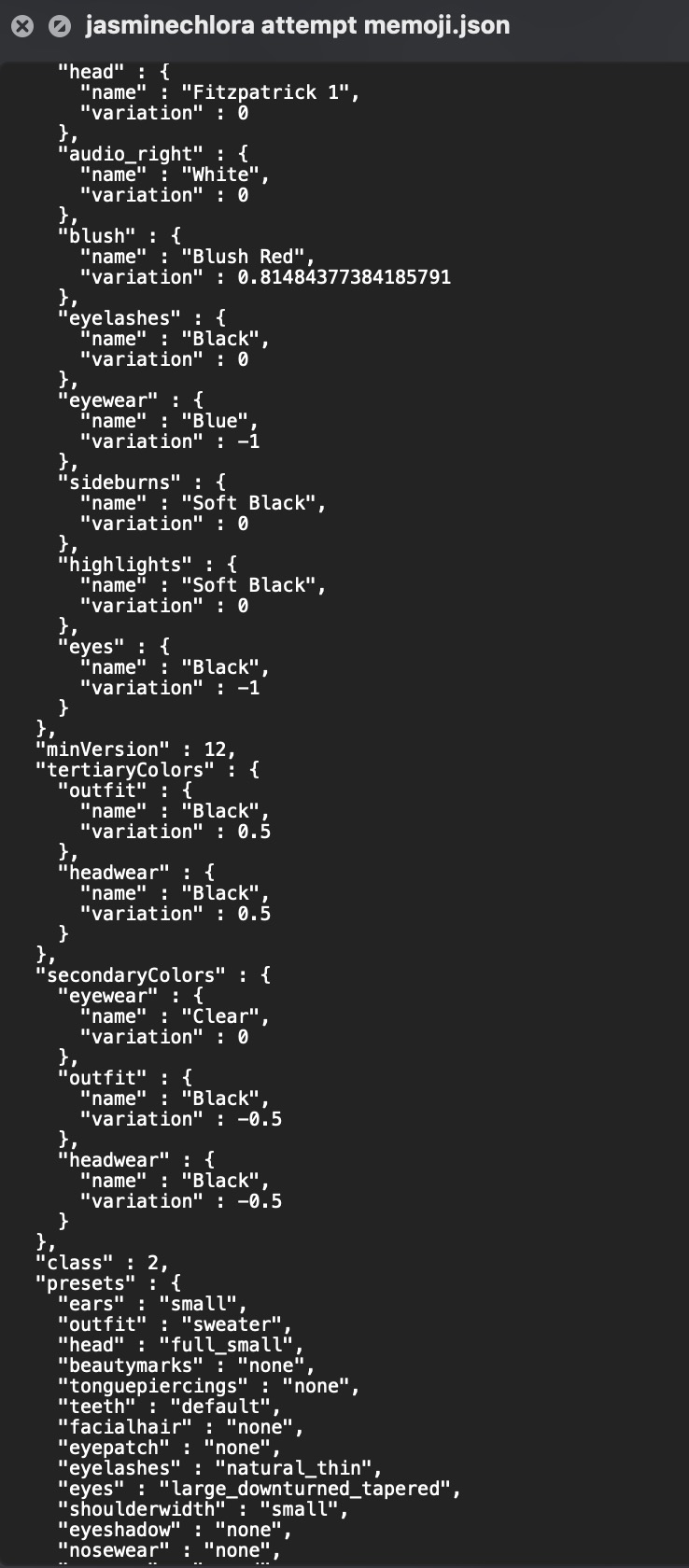
This is actually the format that Apple Memojis are stored in. Lmao.
INCOMPLETE SECTION, SHOULD GO LIKE:
- data is usually like this
- miis are just binary
- they read it in c code like this
- dump fields
- thinking of complicated representations: kaitai, imhex, struct-fu…
- the breakthrough: simply using decompiled ghidra code
blah blah blah blah…
… In hindsight this is obvious but it took me a while to get there. And it’s actually a benefit: there’s no struct-parsing library overhead, no import needed, nothing to install. The Fusion output is essentially the same operations Nintendo wrote, in whatever target language you’re using.
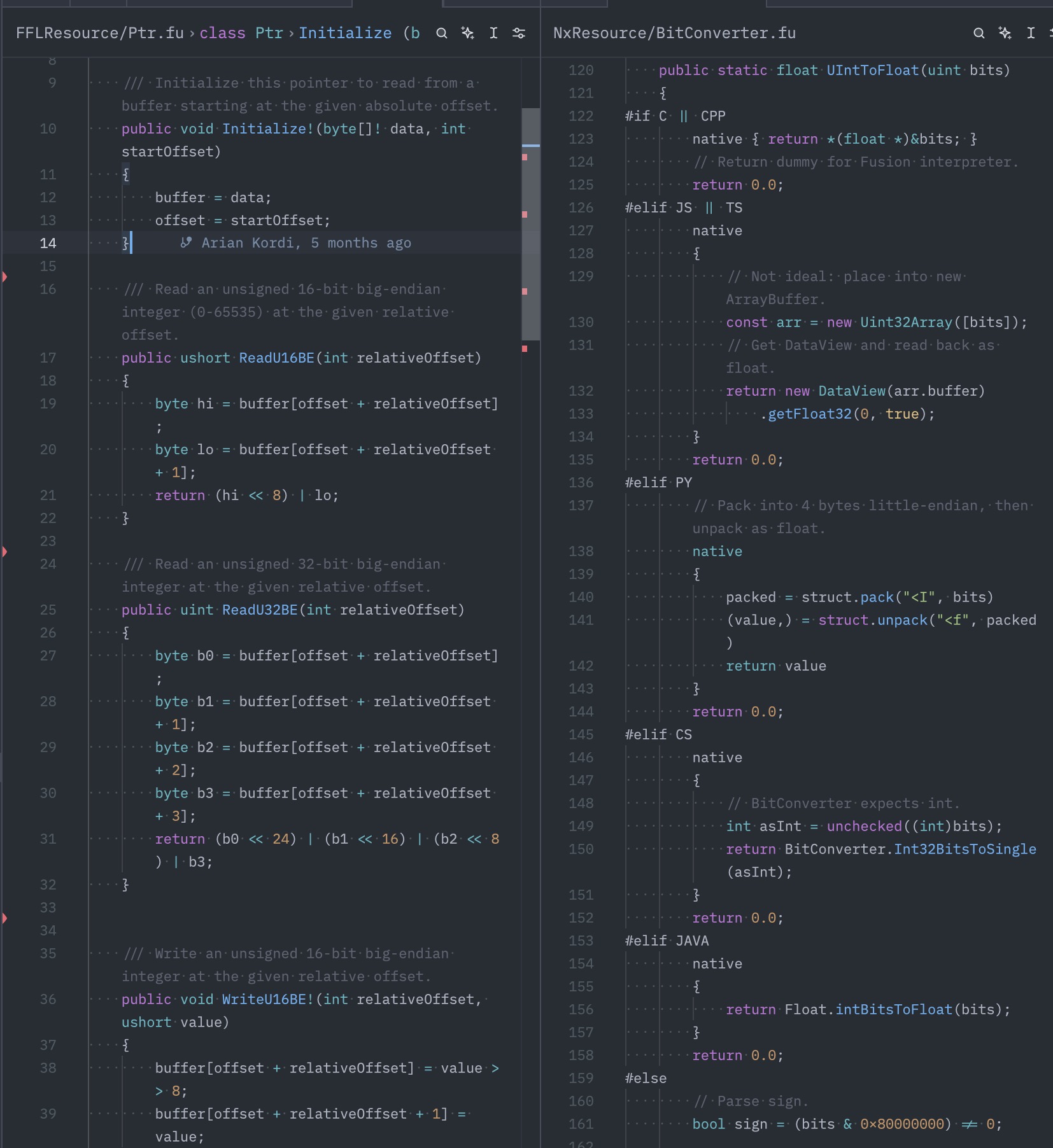
Code that lives outside Fusion (INCOMPLETE: IMAGES)
Fusion is pure library logic: no file reading, no OS APIs, no network. This is by design, since it has to compile to environments where those don’t exist (a browser, an embedded system, etc.).
For Mii specifically, this means a few things live in caller code:
- Data loading: Your code reads bytes from a file or network, and you pass in a buffer. Fine, actually cleaner.
- Decompression (needed for some resource files): You provide a zlib implementation in your target language via an abstract class interface.
- You have the freedom to choose a library that does the same job with smaller or faster code.
- AES encryption (for QR codes): I was able to port an AES implementation to native Fusion code, so you can either use that and it’ll “just work” or substitute your own.
- Async code (JS, C#): Fusion code is synchronous. If you need to call async functions, the goal is that it doesn’t have to go through Fusion.
- Example: If you’re using the browser’s
CompressionStreamAPI which is async, we provide the raw compressed data and you fully handle that part.
- Example: If you’re using the browser’s
- Potential rendering: I will get to this later, but the goal is to assist as much as possible without actually doing any drawing.
Whenever I have to explain the downsides of Fusion, “I/O stays outside” ends up being one of the things that turns into an advantage. Fusion code = pure logic. Caller code = getting bytes in, doing something with results.
That’s a cleaner split than most existing libraries, which tend to mix file reading, parsing, and conversion all together.
The language’s actual limits
It never claimed to be the best language, but jeez..
- No imports: All Fusion code gets built to a single output file. You can bundle multiple .fu files into one output, but for the most part the modules have to be self-contained.
- This keeps dependencies minimal, which I like, but…
- … you can’t split things across packages the way you might in a normal library.
- Byte conversion: Fusion does not have any functions to read multi-byte numbers or floats.
- We actually can make them ourselves, but we may need code specific to each language.
- Memory management: Because the same code will work in C, we should always manage memory as if we are in C. This means reusing objects and byte arrays as much as possible. We never allocate.
- This would also allow the user to use memory pools, which Nintendo code always does including the Face Library.
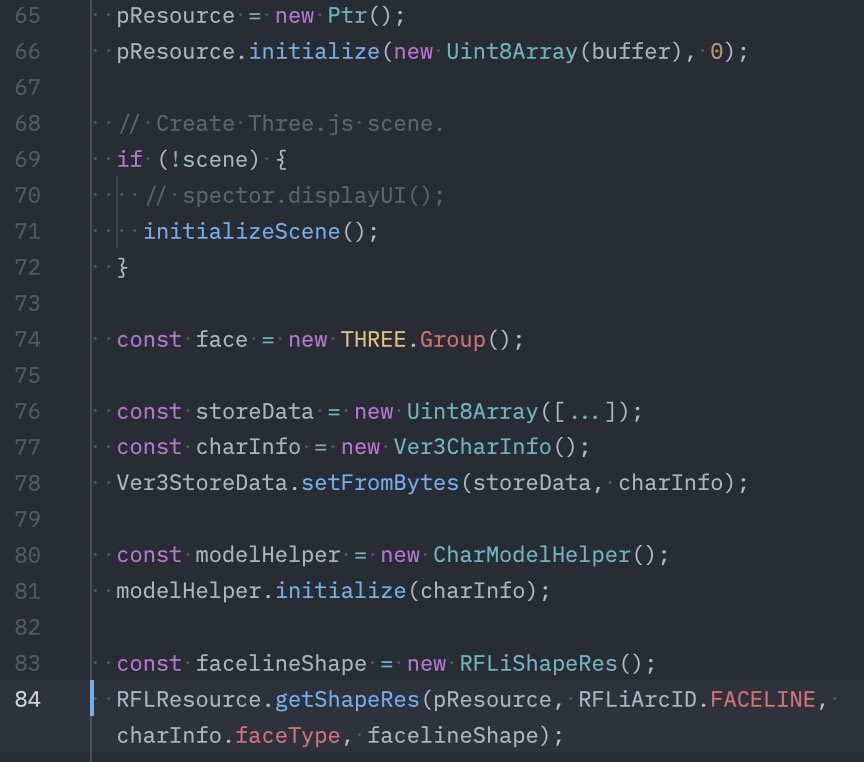
The user’s code is the only one calling “new” here.
None of these are dealbreakers, but they shape how you write code. It’s a different mindset than usual.
How do I know it’s correct?
This is something I’ve been obsessed with since the beginning. I didn’t want to make another “I guessed at the field layout and it probably works” implementation. I wanted to definitively say: this is right, and this is exactly why.
- Decompiled source: Where possible, I reverse directly from the original binary on my own. Algorithms (random Miis), lookup tables, and struct fields are all exact.
- Debug info is a treasure trove when available, and for most Face Library versions it is. This gives us the exact function names, and in some cases, direct names of fields and variables. IMAGE: mask decompilation
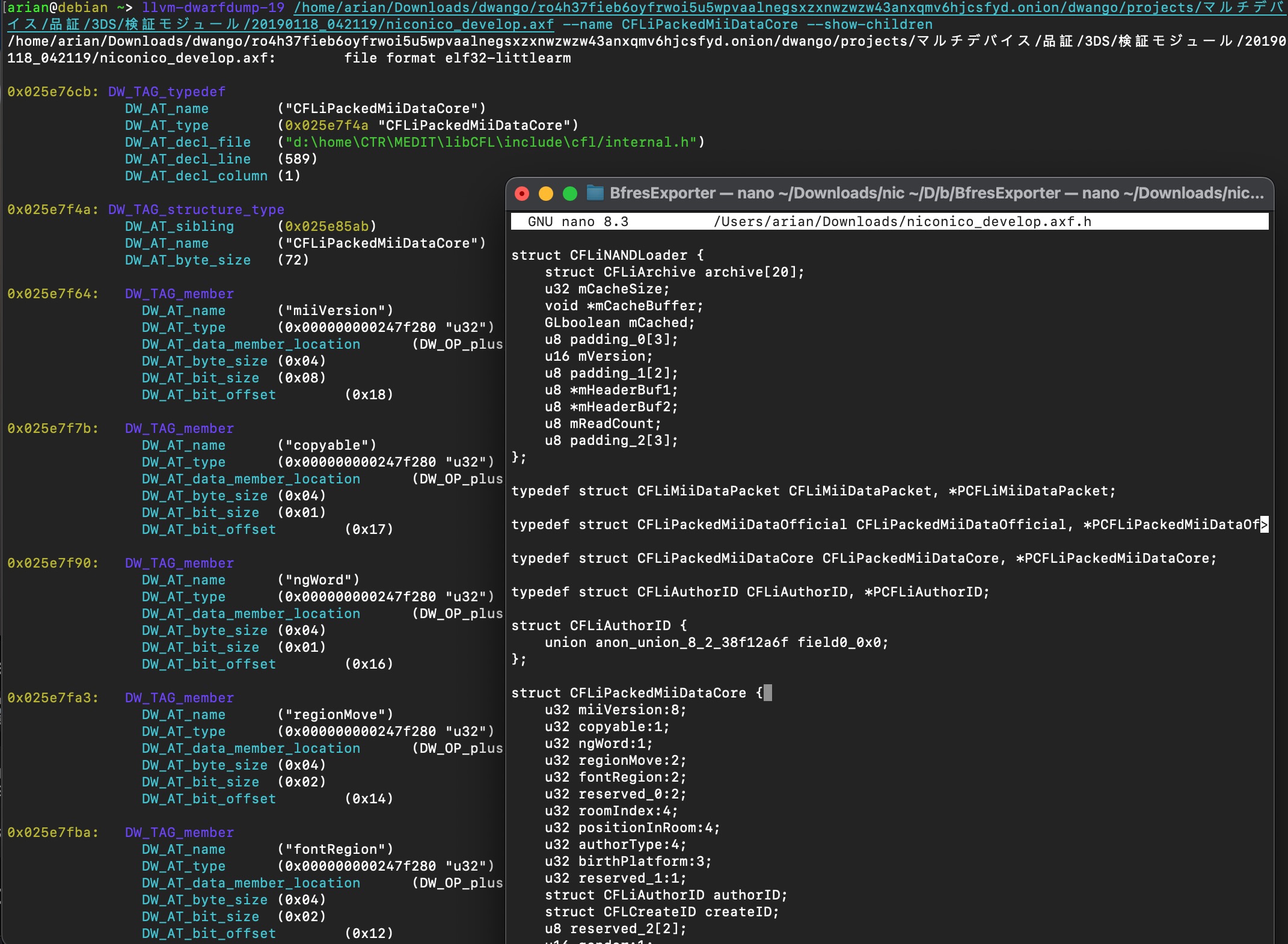
dwarfdump + generated header from CFL debug information. This is the most thorough kind.
- Table extraction: Occasionally there are lookup tables needed for things like colors, conversion, or the random Mii (“look-alike”) feature.
- Extraction scripts: These usually get extracted either manually or in Ghidra, but I wrote scripts that extract these byte-for-byte directly from binaries.
- The scripts also make it easier to do further conversion, e.g. converting colors from floats (decimal-point) to plain numbers (0xRRGGBB).
- Given that these tables take up room, there’s potential to shrink them by using RGB565 (16-bit).
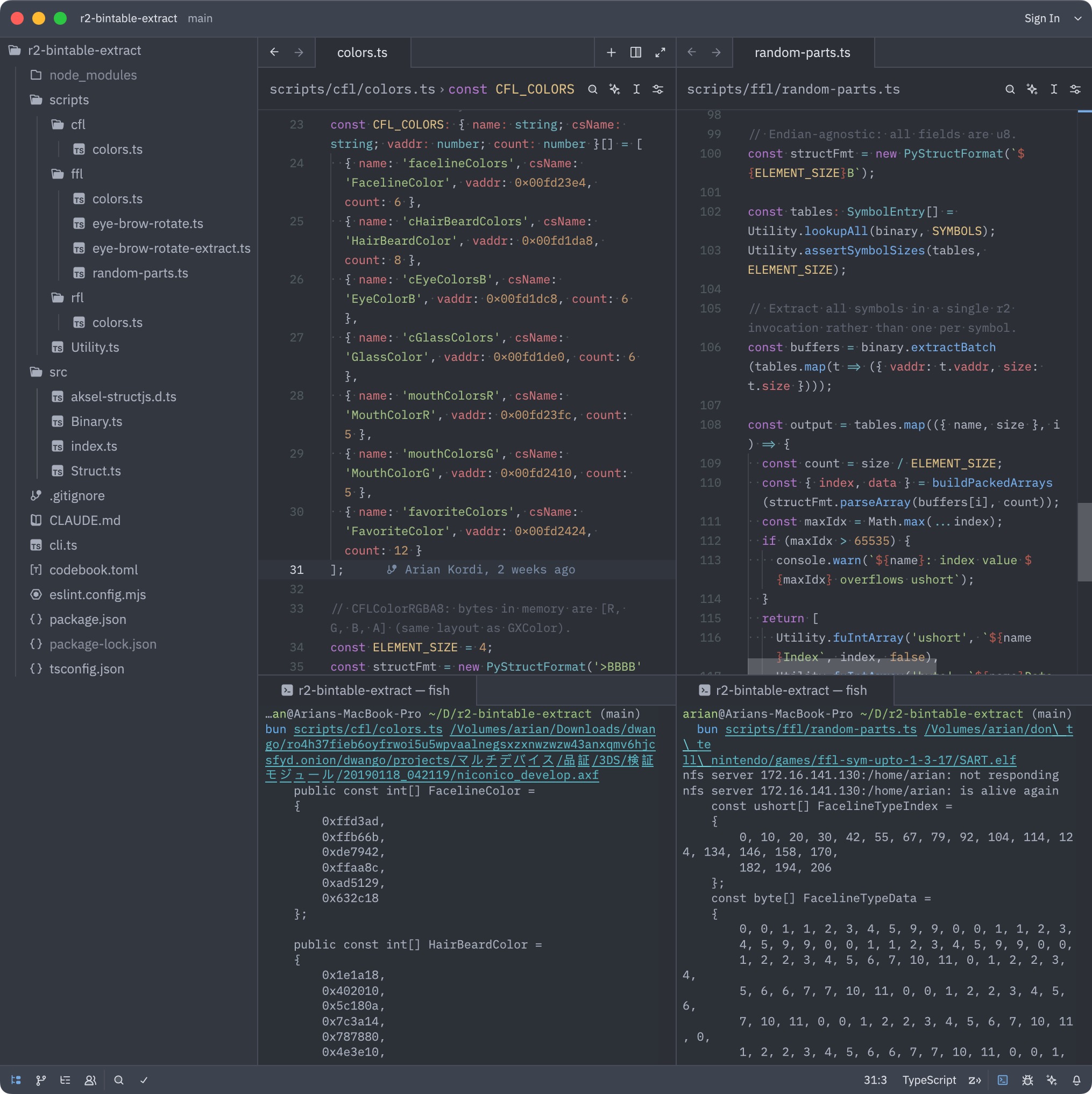
Extraction scripts doing their thing. Colors are converted from float to 0xRRGGBB (no precision loss), the random parts arrays are reordered and that’s what was actually used in my Fusion code.
- Testing against real code
- I validated my random Mii implementation by running the same seed through my Fusion code versus an emulator that executed the function in FFL directly.
- My random Mii impl. matches across thousands of rounds. That’s the standard I want for everything.
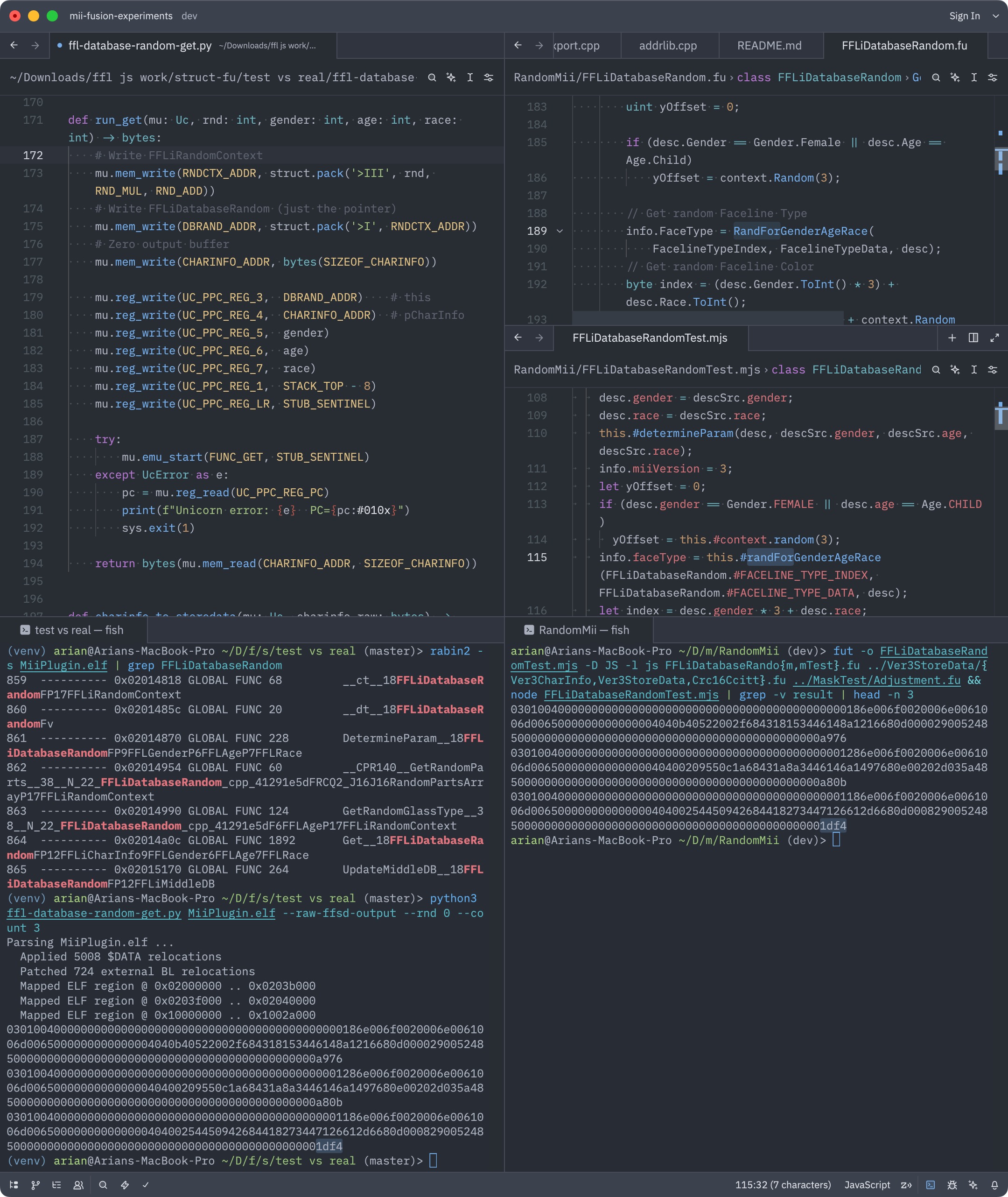
Left side: Python script using unicorn to emulate the random Mii function.
Right: Fusion code producing the same result. Notice “1df4” in the third result.
This FFLiDatabaseRandom decompilation is from scratch by me, since I noticed a mistake in Abood’s version.
- Unit tests: If this sounds lame, you’re right. This is mostly the kind of thing huge companies do. They are great if we want to keep bugs out.
- In fact, the Switch Face Library has unit tests.
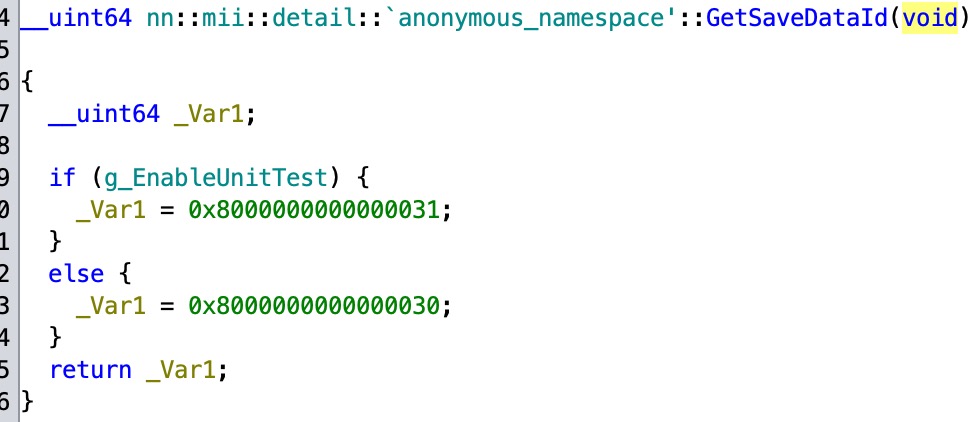
- For my renderer server, I remember features constantly breaking whenever I made changes.
- Fusion doesn’t have its own test framework, but to run the test in all languages we can make a simple program for each test case and run in every language.
    - Coverage can be measured in an individual language like JS, C#, C++. I would love to eventually have high coverage.
- There is a test for the facial features (mask) where the exact coordinates were captured from a Wii U game in RenderDoc, and it matches exactly.
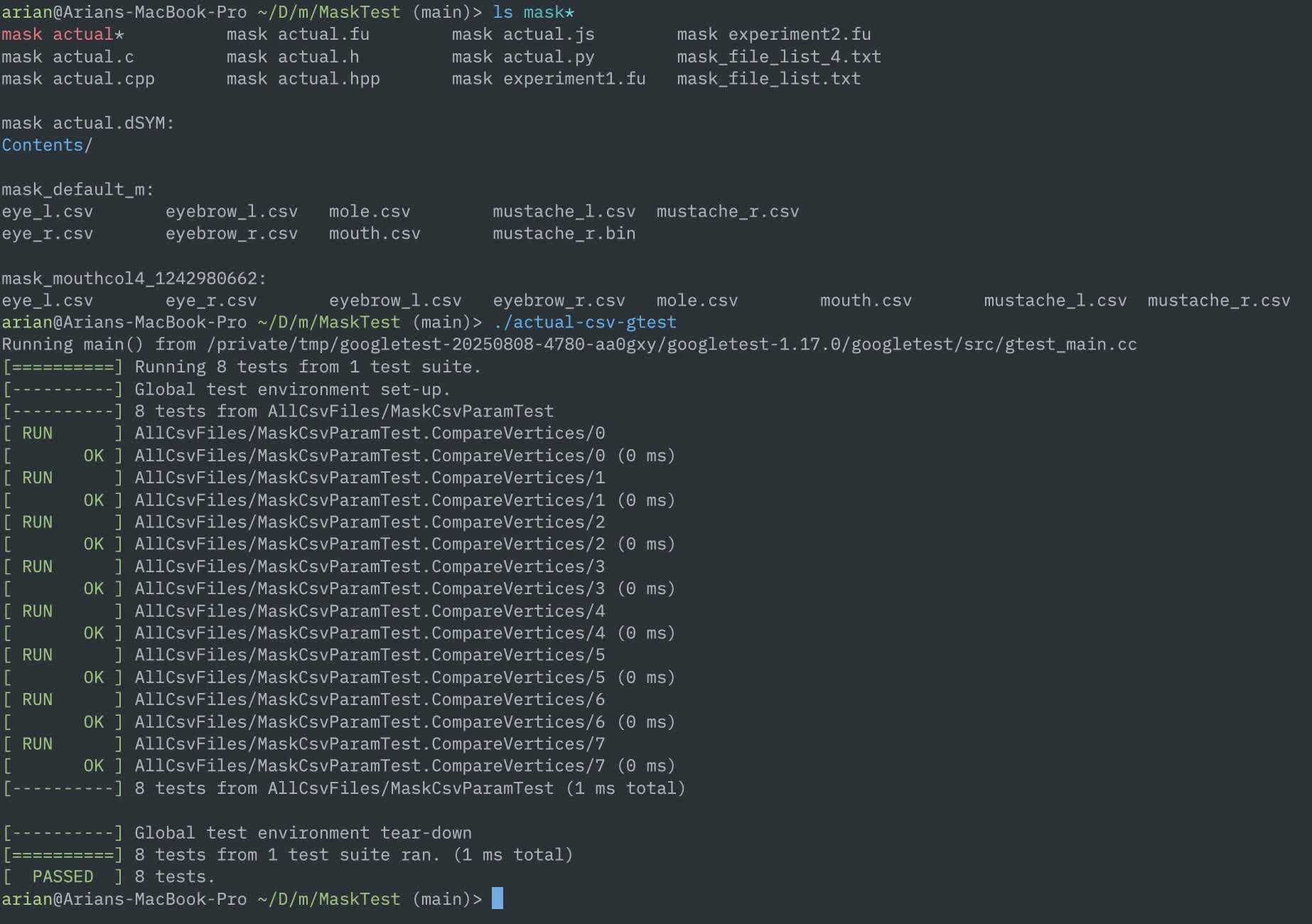
Unit tests for mask positioning logic. The C++ googletest will be ported to Fusion eventually.
What exists right now
INCOMPLETE!
Fusion for Mii rendering? (INCOMPLETE: IMAGES)
This is the part that changed this project from a nice-to-have to a must-have. I asked myself early on, “can Fusion help with rendering Mii data along with reading it?”
Let me get this out of the way: The “Face Library” on Nintendo consoles (FFL, RFL, CFL, etc.) has been shrouded with mystery for some time, but after working with the Wii U version for a year, I can tell you what it is at its core: a Mii model data loader. image: something… FFLDrawParam?
It loads shapes and textures, calculates positions and colors, and tells the GPU what to draw. It’s tightly coupled to each platform’s API (GX2 on Wii U, GX on Wii) making it far less portable than it should be.
When Abood ported the FFL decomp to PC, he replaced the GX2 requirement with (effectively) OpenGL. This worked for a while, but when it came time to make FFLSharp and FFL.js, I had to tear this requirement out and it was not pretty. Compare this to my Fusion code that works in OpenGL (via raylib) and WebGPU (via Three.js).
The approach I plan to take in Fusion is to separate model/texture data from rendering entirely. Fusion handles all pure logic: reading resources, assigning colors, and calculating coordinates for the facial features (mask texture).
Your caller chooses when to load the data (async), from where to load it (from the file, or cached in memory?), and you handle everything on the GPU.
Doesn’t matter if you’re using raw OpenGL, Unity, Godot, Three.js, etc. Load the assets, put the vertex/pixel data into your engine, and you’re good to go. This flexibility can also allow more customization than ever before.
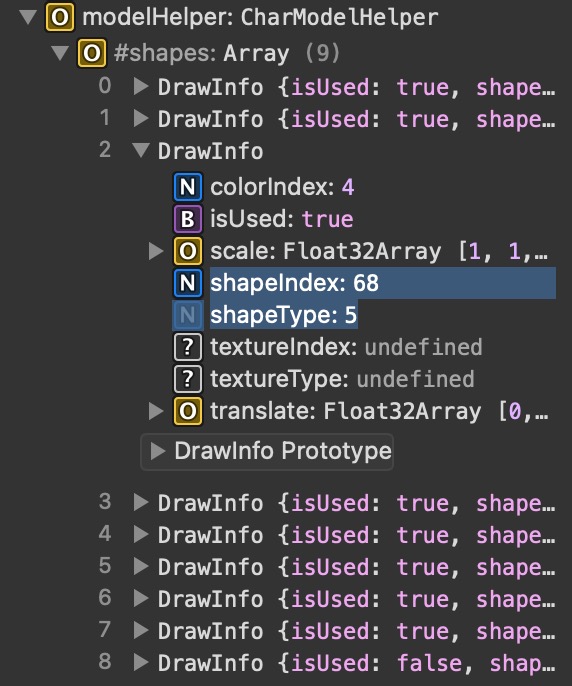
The “CharModelHelper” class tells you which IDs to load, instead of the raw shape/color/texture data like FFL does.
But if a Mii model is just that, a 3D model, can we export it to an open-source format that you can just.. load?
I’ve already toyed around with this by making a glTF exporter for mii-unsecure.ariankordi.net, though I was also able to implement a fully standalone exporter for the glTF format completely from scratch in Fusion. image: read below
Pure Fusion code exporting a glTF model of the hair mesh. Same code in C and JS.
At the moment this is only capable of exporting one model, but I am planning more later on. Now THIS is the dream:
- A library supporting all Mii data and resources in all major languages
- You just give it your input Mii data
- You get a loadable model file out
- Load it right in from memory, it’ll just work(tm)
If I am able to make this work, this would be the ultimate universal Mii rendering solution. But, let’s give it some time and see if I actually get to this point.
Sigh. (REDO BECAUSE THIS SUCKS)
For how long I’ve been thinking about this, it’s definitely been going slower than I’d prefer.
Part of it is scope: what started as a “nice Mii data library” soon had rendering added to it, and has grown to include resource parsers, a glTF encoder, AES, texture swizzling, and more.
I always keep telling myself that “works” is not good enough. I could paste code from Ghidra, see it work, and move on, but I had to think of how to over-engineer structs when what I had worked. At the same time, I keep chasing new features rather than refining and completing what’s there.
Part of it is me. I have a habit of waiting until something is absolutely ready before showing anyone, and “absolutely ready” keeps moving.
There’s also the experience of sharing stuff before I’m ready, then having to watch an incomplete thing get picked up and built on and now you can never fix the parts that were wrong. I’ve seen that happen enough times that I’m cautious.
For now, all of the code is on my machine. It will be out when it’s properly testable, documented, and has examples that actually work. That’s the goal. The core infrastructure is there; what’s left is
testing coverage, the texture side of things, and getting the rendering path from point A to point B in a way that’s actually useful.
Conclusion
I’ve been working towards this for the better part of a year, and I’m more convinced than ever that Fusion is the right tool for this problem even in spite of its flaws.
The constraints that seem limiting at first (no imports, no I/O, no exceptions) end up producing the kind of clean, portable library code that we want. Fusion as a concept is very strong, and if this leads to it getting more popularity and support, that’s worth more than any of my ideas here.
Nobody has done the “Mii library” correctly before. I think I can.
More soon.